
8.3.8. Prometheus#
Warning
Prometheus is a METRICS monitoring tool, not a SUPERVISION monitoring tool. As so, it is really great to gather metrics data (integers, floats) and monitor metrics of the cluster over the time. However, it was not designed to be a supervision tool, and so do a poor job for that. Consider using a tool like Zabbix or equivalent for supervision. Example: What is the current load of my cluster ? -> metrics. Is server c001 answering ping and is ssh able ? -> supervision.
A production cluster needs both a monitoring AND a supervision tools.
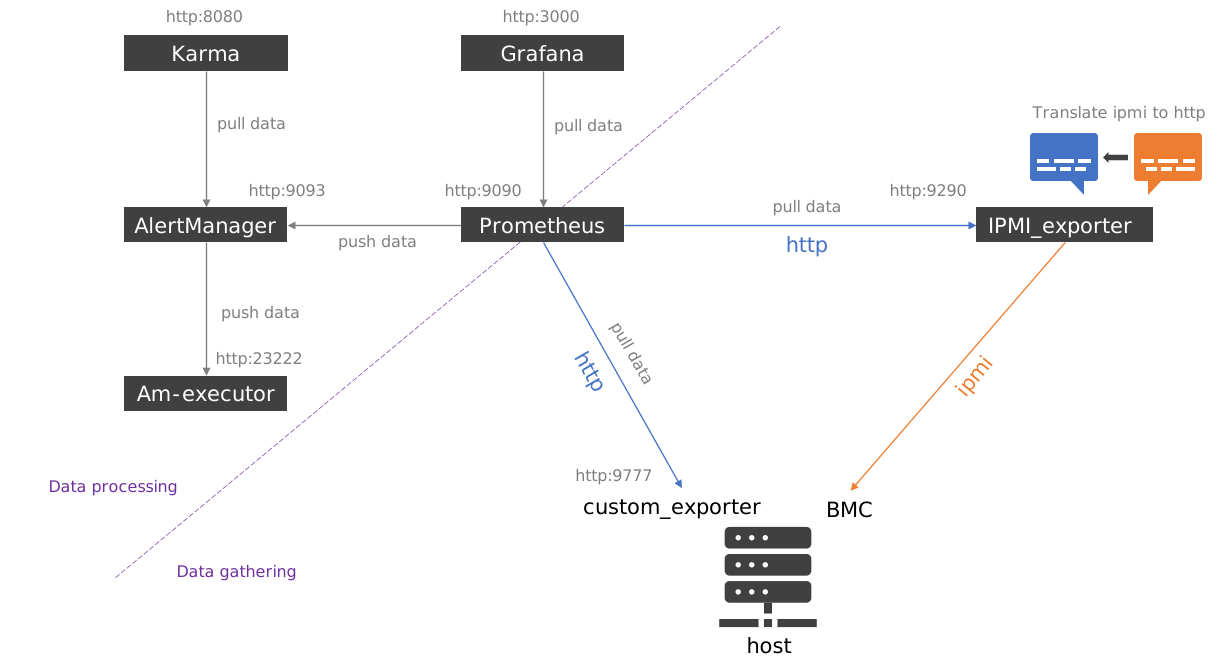
The BlueBanquise stack will install Prometheus and its eco-system:
Prometheus (scrap metrics, store them, evaluate alerts)
Alertmanager (manage alerts by grouping them, sending mails, etc)
Karma (a dashboard for AlertManager)
ipmi_exporter
snmp_exporter
modbus_exporter
other exporters provided by admin: * slurm_exporter * node_exporter * …
Custom exporters python modules
Note
Prometheus is available by default at http://localhost:9090
Alertmanager is available by default at http://localhost:9093
Karma is available by default at http://localhost:8080 (admin / admin)
8.3.8.1. Server or/and client#
Server part of the role deploys Prometheus, Alertmanager, Karma, ipmi_exporter, snmp_exporter, etc., and their respective configuration files and service files.
To install server part on a host, set variable prometheus_server to true.
Client part of the role deploys other exporters or custom exporter python modules on clients.
To install client part on a host, set variable prometheus_client to true.
Important: while server related variables are dedicated to server configuration, client variables are used by both client and server part of the role.
8.3.8.2. Basic Server configuration#
It is assumed that for the server hosts, in the inventory or in the playbook, variable
prometheus_server is set to true.
prometheus_server: true
In the basic usage, the server role will install and setup the following tools:
Prometheus: scrap and store metrics, fire alerts.
Alertmanager: manage alerts fired by Prometheus.
Karma: dashboard to monitor alerts managed by Alertmanager.
ipmi_exporter: translate ipmi data to http scrapable by Prometheus (not installed by default).
snmp_exporter: translate snmp data to http scrapable by Prometheus (not installed by default).
modbus_exporter: translate Modbus-TCP data to http scrapable by Prometheus (not installed by default).
Which means all of these services will, be running on the same management host.
To manage what server part of the role should install and setup, defaults variables can be used. The following variables, with their default values shown here, are available:
prometheus_server_manage_prometheus: true
prometheus_server_manage_alertmanager: true
prometheus_server_manage_karma: true
prometheus_server_manage_am_executor: false
prometheus_server_manage_ipmi_exporter: false
prometheus_server_manage_snmp_exporter: false
prometheus_server_manage_modbus_exporter: false
8.3.8.2.1. Prometheus configuration#
8.3.8.2.1.1. Scraping#
By default, role will inherit from values set in its defaults folder. You may wish to update these values to your needs, as these values set the different timings used by Prometheus.
To do so, create file inventory/group_vars/all/prometheus.yml with the
following content (tuned to your needs, all global values can be defined):
prometheus_server_configuration_global:
  scrape_interval: 1m
  scrape_timeout: 20s
  evaluation_interval: 2m
To understand the meaning of these values, refer to:
If you do not set a value, Prometheus will use its defaults values, described in the main documentation.
Warning: size your storage available for Prometheus database according to the size of the cluster and the scrape_interval set here. Scraping too often might need a lot of storage.
These timings will apply to all exporters scraping. It is however possible to tune specific timings for each exporter. This part is covered in the client section of this readme.
8.3.8.2.1.2. Alerting#
It is key to understand that in the Prometheus ecosystem, alerts are calculated and fired by Prometheus and not Alertmanager. Alertmanager is a tool to managed alerts that were fired by Prometheus (group alerts, send emails, etc).
By default, the role will only add a simple alerts file into the /etc/prometheus/alerts folder. This file contains very basic alerts related to exporters down or Prometheus own scraping.
The role also offers to install few other alerts, each related to a specific exporter.
To install these additional alerts, simply enable them by adding them in the
prometheus_server_additional_alerts list variable. The following additional
alerts are available:
prometheus_server_additional_alerts:
  - ipmi_exporter
  - node_exporter
You will probably wish to add more alerts. You can add more files in the /etc/prometheus/alerts/ directory, and these will be loaded by Prometheus at startup.
To do so, either add them manually using another way or
add them in the inventory by adding their YAML code in the file
inventory/group_vars/all/prometheus_alerts.yml, with key prometheus_server_custom_alerts.
For example:
prometheus_server_custom_alerts: !unsafe >
  groups:
    - name: user alerts
      rules:
      - alert: HostOutOfMemory
        expr: node_memory_MemAvailable_bytes / node_memory_MemTotal_bytes * 100 < 10
        for: 2m
        labels:
          severity: warning
        annotations:
          summary: "Host out of memory (instance {{ $labels.instance }})"
          description: "Node memory is filling up (< 10% left)\n  VALUE = {{ $value }}\n  LABELS: {{ $labels }}"
      - alert: HostOutOfInodes
        expr: node_filesystem_files_free{mountpoint ="/rootfs"} / node_filesystem_files{mountpoint="/rootfs"} * 100 < 10 and ON (instance, device, mountpoint) node_filesystem_readonly{mountpoint="/rootfs"} == 0
        for: 2m
        labels:
          severity: warning
        annotations:
          summary: "Host out of inodes (instance {{ $labels.instance }})"
          description: "Disk is almost running out of available inodes (< 10% left)\n  VALUE = {{ $value }}\n  LABELS: {{ $labels }}"
8.3.8.2.2. Alertmanager configuration#
Alertmanager parameters are highly depending of users wishes.
Considering that, it is difficult to not propose a fully customizable parameters
file. This is why AlertManager whole configuration is contained in a single
variable, called prometheus_server_alertmanager_raw_configuration. The default
content (native YAML) is the following:
prometheus_server_alertmanager_raw_configuration:
  global:
    smtp_smarthost: 'localhost:25'
    smtp_from: 'alertmanager@your_domain'
    smtp_require_tls: false

  route:
    group_by: ['alertname', 'job']
    group_wait: 1m
    group_interval: 10m
    repeat_interval: 3h
    receiver: sys-admin-team

  receivers:
    - name: 'sys-admin-team'
      email_configs:
        - to: 'sys-admin-team@bluebanquise.com'

  inhibit_rules:
  - source_match:
      severity: 'critical'
    target_match:
      severity: 'warning'
    equal: ['alertname', 'cluster', 'service']
If you wish to tune the content of this file, simply copy this variable in the inventory and tune it according to your needs.
To understand meaning of these values, refer to https://prometheus.io/docs/alerting/latest/configuration/ or to https://www.robustperception.io/whats-the-difference-between-group_interval-group_wait-and-repeat_interval.
8.3.8.2.3. Karma configuration#
Few Karma parameters can be defined if needed.
To set karma username and password, use:
prometheus_server_karma_username: admin
prometheus_server_karma_password: admin
Default is admin / admin.
8.3.8.3. Basic Client configuration#
It is assumed that for the client hosts, in the inventory or in the playbook, variable
prometheus_client is set to true.
prometheus_client: true
The client side of the role simply install and start local exporters on nodes.
8.3.8.3.1. Exporters#
Each exporter has its own http port. For example, node_exporter is available at http://localhost:9100 .
Both server and client side of the role share the same variables for exporters.
Two main variables are available:
prometheus_exporters_to_scrapeprometheus_exporters_groups_to_scrape
Both variables are very similar.
prometheus_exporters_to_scrape is used by server side only. Exporters listed
here will be scraped by Prometheus using defined address and port.
Exporters listed here have to be installed manually or with another role/task since
client side of the role will not consider them.
prometheus_exporters_to_scrape:
  - name: slurm_exporter
    scrape_interval: 1m
    scrape_timeout: 30s
    address: 10.10.7.11
    port: 9817
  - name: ha_cluster_exporter
    scrape_interval: 1m
    scrape_timeout: 30s
    address: 10.10.7.11
    port: 9664
prometheus_exporters_groups_to_scrape is used by both server and client sides.
Server side will scrap these exporters on all the nodes of the group, while
client side will install them on all nodes of the group.
It is important to understand that the client side of the role is capable of generating everything needed by an exporter binary: service file, users, working dir, etc. The role will generate these elements depending of the variables present. The list of capabilities is described after the example.
Note that if port is not present, server side will ignore the exporter, but
client side will install and start it. This can be used to install
prometheus_exporters_to_scrape in HA context.
prometheus_exporters_groups_to_scrape:
  fn_management:
    - name: node_exporter
      service: node_exporter
      package: bluebanquise-node-exporter
      port: 9100
  fn_login:
    - name: node_exporter
      package: bluebanquise-node-exporter
      service: node_exporter
      port: 9100
      user: node_exporter
      group: node_exporter
      home: /var/lib/node_exporter
      uid: 950
      gid: 950
    - name: login_exporter
      package: login_exporter
      service: login_exporter
      scrape_interval: 1m
      scrape_timeout: 30s
      port: 9122
Note here that scrape_interval and scrape_timeout are optional
values for each exporter here. These will override default values only if set.
The following actions can occur:
If group is defined, a group will be created for the exporter (and set as default group in service file)
If gid is defined and group is defined, the group created will have this gid
If user is defined, a user will be created for the exporter (and set as default user in service file)
If uid is defined and user is defined, the user created will have this uid
If package is defined, the corresponding package will be installed (should be exporter binary)
If service is defined, a systemd service file will be generated and service will be started.
If service is defined, a corresponding /etc/{{service}} folder will be created if not exist
If port is defined, the port will be opened in the firewall if firewall is up
You can fine tune the service configuration using dedicated parameters
service_launch_parameters and service_raw_configuration:
prometheus_exporters_groups_to_scrape:
  fn_management:
    - name: node_exporter
      package: bluebanquise-node-exporter
      port: 9100
      path: /bin/node_exporter
      service: node_exporter
      service_workingdirectory: /etc/node_exporter
      service_type: simple
      service_description: This is node_exporter from Prometheus main project
      service_launch_parameters: --collector.disable-defaults --collector.filesystem
      service_raw_configuration:
        - Restart=always
        - RestartSec=1
8.3.8.4. IPMI, SNMP and Modbus#
ipmi_exporter, snmp_exporter and modbus_exporter behave differently: they act as translation gateways between Prometheus and the target. Which means, if you wish for example to query IPMI data of a node, you do not install the exporter on the node itself. You query the ipmi_exporter, which will itself query the target for IPMI data. This is why, in the basic configuration, these two exporters are installed by the server part of the role and not the client part.
To have the exporter installed by the server part of the role, set their respective variables to true or false, according to your needs:
prometheus_server_manage_ipmi_exporter: true
prometheus_server_manage_snmp_exporter: false
prometheus_server_manage_modbus_exporter: false
You then need to specify which hardware groups of nodes have to be
ipmi scraped. To do so, simply set the global variable prometheus_ipmi_scrape_hardware_groups
in the default inventory/group_vars/all/prometheus.yml file:
prometheus_ipmi_scrape_hardware_groups:
  - name: hw_supermicro_X1
    scrape_interval: 5m
    scrape_timeout: 2m
  - name: hw_Dell_Q1
  - name: hw_supermicro_X2
This will add these into prometheus targets configuration for scraping via ipmi_exporter.
Note that you can set custom scrape_interval and scrape_timeout for ipmi or snmp using dedicated variables shown in the example above.
Note also that ipmi_exporter will need hw_board_authentication dictionary
to be set for each hardware group that needs ipmi data scraping.
You can also create an snmp configuration using the prometheus_snmp_scrape_hardware_groups key:
prometheus_snmp_scrape_hardware_groups:
  - name: hw_pdu
    snmp_module: pdu
  - name: hw_cumulus
    snmp_module: swl
  - name: hw_wcd
    snmp_module: wcd
For Modbus it’s prometheus_modbus_tcp_scrape_hardware_group, e.g.:
prometheus_modbus_scrape_hardware_groups:
  - name: wilo_pumps
    scrape_interval: 15s
    scrape_timeout: 15s
    labels:
      device_type: "pump"
but also definitions on device level are required, e.g.:
all:
  hosts:
    wilo1:
      labels:
        rack: "rack42"
      modbus_tcp_devices:
        - id: 1
          exporter_module: "wilo_stratos_maxo"
          labels:
            __scrape_interval__: "30s"
All the label variables specified above are optional prometheus labels.
The rather complicated structure of the configuration of modbus_exporter is due to the exporter being the “gateway” to query Modbus-TCP devices which are technically “gateways” to a Modbus-RTU network containing an arbitrary amount of devices.
8.3.8.5. Advanced usage#
8.3.8.5.1. Set custom launch parameters#
Since Prometheus ecosystem has been originally designed to run into containers, some major parameters are passed to the binary at launch. This is why the current role generate the systemd service file to integrate custom launch parameters.
The following variables, with their default values shown here, are available to tune launch parameters of each tool:
prometheus_server_launch_parameters: |
  --config.file /etc/prometheus/prometheus.yml \
  --storage.tsdb.path /var/lib/prometheus/ \
  --web.console.templates=/etc/prometheus/consoles \
  --web.console.libraries=/etc/prometheus/console_libraries $PROMETHEUS_OPTIONS

prometheus_server_alertmanager_launch_parameters: |
  --config.file=/etc/alertmanager/alertmanager.yml

prometheus_server_karma_launch_parameters: |
  --config.file=/etc/karma/karma.yml

prometheus_server_ipmi_exporter_launch_parameters: |
  --config.file=/etc/ipmi_exporter/ipmi_config.yml

prometheus_server_snmp_exporter_launch_parameters: |
  --config.file=/etc/snmp_exporter/snmp.yml

prometheus_server_modbus_exporter_launch_parameters: |
  --config.file=/etc/modbus_exporter/modbus.yml
For example, to manipulate data retention (default 15 days) and ask for 60 days, set this variable:
prometheus_server_launch_parameters: |
  --storage.tsdb.retention.time 60d \
  --config.file /etc/prometheus/prometheus.yml \
  --storage.tsdb.path /var/lib/prometheus/ \
  --web.console.templates=/etc/prometheus/consoles \
  --web.console.libraries=/etc/prometheus/console_libraries $PROMETHEUS_OPTIONS
Note that with recent version of Prometheus, you can also set the data base maximum size instead. See more at https://www.robustperception.io/configuring-prometheus-storage-retention .
Another example, to manipulate database path, combine with a 60 days retention, set:
prometheus_server_launch_parameters: |
  --storage.tsdb.pat /prometheus \
  --storage.tsdb.retention.time 60d \
  --config.file /etc/prometheus/prometheus.yml \
  --storage.tsdb.path /var/lib/prometheus/ \
  --web.console.templates=/etc/prometheus/consoles \
  --web.console.libraries=/etc/prometheus/console_libraries $PROMETHEUS_OPTIONS
Etc. See all available options at https://gist.github.com/0x0I/eec137d55a26a16d836b84cbc186ab52 .
8.3.8.5.2. Manipulate firewall#
On some system, you may wish that the whole server side ecosystem is reachable from the network or not (you may wish to reach it using an ssh port forwarding only for example).
If variable prometheus_firewall_open is set to true, Prometheus and AlertManager will be reachable from the network on the prometheus_server_firewall_zone defined (default public). If not, firewall ports related to both will remain closed.
Example:
prometheus_firewall_open: true
prometheus_server_firewall_zone: internal
Regarding client side, variable prometheus_client_firewall_zone allows to
set the firewall zone to be open for exporters to listen for queries.
8.3.8.5.3. Splitting services#
For some specific configurations, it is needed to split services over multiple hosts. For example to force ipmi_exporter and/or snmp_exporter to be deployed on another host than the one running Prometheus.
To do so, disable ipmi and snmp on the hosts running Prometheus (host1), using this configuration as host1 dedicated hostvars :
prometheus_server_manage_prometheus: true
prometheus_server_manage_alertmanager: true
prometheus_server_manage_karma: true
prometheus_server_manage_am_executor: false
prometheus_server_manage_ipmi_exporter: false
prometheus_server_manage_snmp_exporter: false
prometheus_server_manage_modbus_exporter: false
And activate them on the host you wish them to run (host2), using the opposite values for host2 dedicated hostvars:
prometheus_server_manage_prometheus: false
prometheus_server_manage_alertmanager: false
prometheus_server_manage_karma: false
prometheus_server_manage_am_executor: false
prometheus_server_manage_ipmi_exporter: true
prometheus_server_manage_snmp_exporter: true
prometheus_server_manage_modbus_exporter: true
To ensure everyone can communicate, set now these global variables in group_vars/all (these variables are all set to localhost by default):
prometheus_server_prometheus_host: host1
prometheus_server_alertmanager_host: host1
prometheus_server_karma_host: host1
prometheus_server_am_executor_host:
prometheus_server_ipmi_exporter_host: host2
prometheus_server_snmp_exporter_host: host2
prometheus_server_modbus_exporter_host: host2
This can be used to spread all main services.
Note: if any prometheus_server_manage_X variable is not defined, it is considered false.
Warning: if your firewall is running, you may need to open ports for desired services.
8.3.8.5.4. Adding raw prometheus.conf scraping jobs#
It is possible to inject raw scraping jobs into the prometheus.conf file using the following multi lines variable:
prometheus_server_prometheus_raw_jobs:
8.3.8.5.5. Adding raw prometheus.conf configuration#
It is possible to inject raw prometheus configuration parameters into the prometheus.conf file using the following multi lines variable:
prometheus_server_prometheus_raw_configuration:
8.3.8.5.6. TLS and/or Basic Authentication#
To enable TLS encryption, you need to set these variables:
prometheus_server_enable_tls: true
prometheus_server_tls_cert_file:
prometheus_server_tls_key_file:
To enable basic authentication, you need to set these variables:
prometheus_server_enable_basic_auth: true
prometheus_server_basic_auth_user:
prometheus_server_basic_auth_password:
prometheus_server_basic_auth_hash_password:
Note: You can use python3-bcrypt to generate hashed password. See more at https://prometheus.io/docs/guides/basic-auth/#hashing-a-password .
To load web configuration file, use the –web.config.file flag:
prometheus_server_prometheus_launch_parameters: |
  --config.file /etc/prometheus/prometheus.yml \
  --storage.tsdb.path /var/lib/prometheus/ \
  --web.console.templates=/etc/prometheus/consoles \
  --web.console.libraries=/etc/prometheus/console_libraries $PROMETHEUS_OPTIONS \
  --web.config.file=/etc/prometheus/web.yml